Podcast Loudness: −16 LUFS Explained (and When −14 Applies)
What −16 LUFS means, why Apple Podcasts asks for it, when −14 applies, and how to hit it with a true-peak limiter in Audacity, Audition or FFmpeg.
In this article
You finish an episode, play it in the car, and the intro music nearly takes your ears off. Then the guest comes in so quietly you’re reaching for the volume knob at a red light. That’s a loudness problem, and −16 LUFS is the number that fixes it.
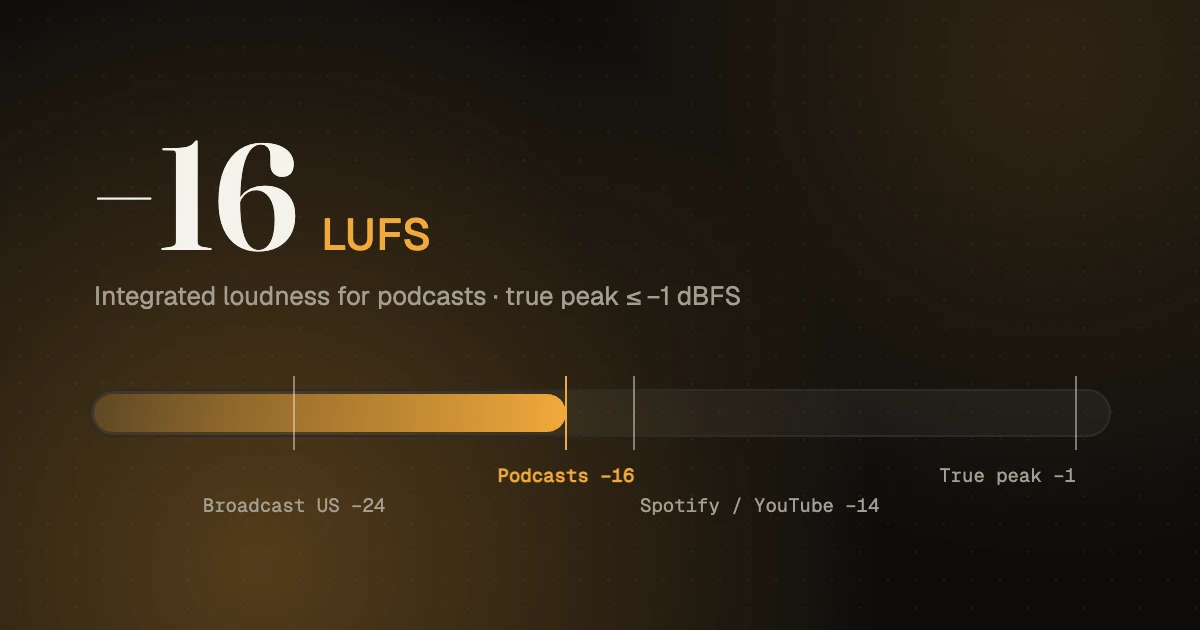
Aim for −16 LUFS integrated loudness (within 1 dB either way) with true peaks no higher than −1 dBFS. That’s what Apple Podcasts asks for, and most of the podcast world has settled on it. LUFS measures how loud audio sounds over the whole episode, not just its loudest spike, so hitting it means your show plays at the same volume as the ones before and after it.
What LUFS actually measures
LUFS stands for Loudness Units relative to Full Scale. It’s a way of measuring loudness the way people hear it: the meter weights frequencies roughly like our ears do and averages over time. LKFS is the same measurement with a different name; Apple writes “−16 dB LKFS” and means exactly what everyone else means by −16 LUFS.
The older way to set levels was peak normalization: make the loudest moment hit, say, −1 dB. The trouble is that one loud laugh decides the level of the whole episode. Two shows peak-normalized to the same number can sound wildly different in loudness. LUFS fixes that by measuring the whole thing.
Three readings show up on most meters:
- Integrated: the average loudness of the whole file. This is the −16 number.
- Short-term and momentary: loudness over the last few seconds. Handy for spotting a section that jumps out.
- True peak: the highest level the waveform reaches, including between samples once it’s converted to sound. This is the −1 dB number.
Numbers closer to zero are louder: −14 LUFS is louder than −16, which is louder than −23.
Why −16, and what about −14?
Apple’s audio requirements say the overall loudness should stay around −16 dB LKFS with a ±1 dB tolerance, and the true peak shouldn’t exceed −1 dB FS. Because Apple was the biggest podcast directory for years, −16 became the default for the industry.
You’ll also see −14 LUFS mentioned for Spotify and YouTube. Those platforms turn louder audio down during playback so everything plays at a similar level. Our advice: master podcasts to −16. It’s what Apple asks for, it leaves a little more room for natural dynamics in speech, and the gap to −14 is small enough that listeners won’t notice it on other apps.
| Where it plays | Common target | True peak |
|---|---|---|
| Apple Podcasts (and the usual podcast default) | −16 LUFS ±1 dB | −1 dBFS or lower |
| Mono podcast file | about −19 LUFS (sounds like −16 in stereo) | −1 dBFS |
| Spotify and YouTube (playback normalization) | around −14 LUFS | −1 dBFS is a safe ceiling |
| Broadcast radio and TV | −24 LUFS (US), −23 LUFS (Europe) | Set by each broadcaster |
The mono catch
A mono file can measure as quieter than the same audio in stereo, because a stereo meter adds the two channels together. As the Podnews loudness guide puts it, a mono file at −19 LUFS should sound just as loud as a stereo file at −16. Most podcast tools already handle this when you choose a −16 preset, but if your meter reads a mono file as −19 and you push it up to −16, it will play too loud. Check how your tool treats mono before you trust the number.
How to get your podcast to −16 LUFS
Loudness is the last step, not the first. Do it in this order:
- Clean and level each voice. Noise reduction, EQ and compression on each speaker, so they sit close together before anything else happens. (Our podcast editing guide covers this.)
- Mix the episode, including music and ad reads, so nothing jumps out.
- Put a true-peak limiter on the master with the ceiling at −1 dB (some engineers use −1.5 for extra safety once the file is turned into MP3).
- Measure the whole episode and note the integrated loudness.
- Adjust gain before the limiter until the integrated reading lands between −17 and −15. Measure again.
- Export and measure the final MP3 or AAC too. Encoding can nudge peaks up slightly.
Tools that do this well:
- Audacity has a Loudness Normalization effect that sets a LUFS target directly.
- Adobe Audition has Match Loudness with podcast presets.
- Youlean Loudness Meter has a free version that plugs into most editors and shows integrated loudness and true peak.
- FFmpeg’s loudnorm filter for anyone comfortable on the command line, for example
loudnorm=I=-16:TP=-1.5:LRA=11. - Auphonic processes a file to a target loudness automatically. Note that it doesn’t apply the mono adjustment described above.
Normalizing a badly balanced mix to −16 doesn’t make it sound good, it just makes it the right average loudness. If the host is twice as loud as the guest, the episode can measure a perfect −16 and still have listeners riding the volume knob. Fix the balance first.
Mistakes we hear all the time
- Intro music far louder than the voices. Music is dense; it measures and sounds loud. Bring it down until the first spoken words don’t feel like a drop.
- Normalizing first, then compressing. Compression changes the loudness, so you have to measure again anyway.
- Peak normalizing and calling it done. A file peak-normalized to −1 dB can land anywhere from −24 to −14 LUFS.
- Crushing everything to sound “radio loud”. Heavy limiting makes speech tiring to listen to. −16 doesn’t need it.
- Ad reads recorded separately at a different level. Measure them on their own, then match them to the episode.
If you’d rather never think about this again, mixing and mastering are part of our podcast editing service; tell us your target when you send the files.
- Audio converter: export a mastered WAV as AAC for your podcast host.
- Audio and video cutter: trim the start and end without re-encoding.
All free in your browser, with nothing uploaded and no sign-up.
FAQ
Is −16 LUFS too quiet for Spotify?
Not in practice. The difference between −16 and −14 is 2 dB, which is hard to notice when episodes play one after another. Mastering to −16 keeps you within Apple’s requirement without sounding quiet elsewhere.
What’s the difference between LUFS and dB?
dB on a normal meter shows signal level at a moment, mostly peaks. LUFS shows perceived loudness averaged over time. One LU equals one dB of change, so turning a −18 LUFS file up by 2 dB makes it −16 LUFS.
Should a podcast be mono or stereo?
Speech-only shows are fine in mono, and the files are smaller. If you use stereo music or sound design, export in stereo. Either way, aim for the same perceived loudness: −16 LUFS stereo or the mono equivalent.
What true peak should a podcast have?
No higher than −1 dBFS, which is Apple’s requirement. Many editors use −1.5 dBFS to leave room for the small peaks that MP3 and AAC encoding can add.
Sources, checked 10 November 2026: Apple, Apple Podcasts audio requirements; Podnews, The LUFS and LKFS FAQ for podcasters.